AI Image Generation

OnlyGFs.ai is an advanced AI platform designed to provide deeply personal and immersive AI companion experiences. It enables users to engage in natural conversations, creative roleplay, and generate custom images and videos with intelligent AI companions, all within a private and encrypted environment. This platform is ideal for individuals seeking companionship, a creative outlet for storytelling, or a safe space for self-expression and exploration. Key Features Natural, personality-driven conversations with emotional nuance and context retention. Creative roleplay capabilities with custom scenario building and adaptive storytelling. AI image generation for custom photos and scenes in the companion's style. AI video generation for short, dynamic custom video clips. Conversational memory ensuring companions remember past interactions and preferences. Access to 50+ diverse AI companion personas, each with unique personalities and backstories. End-to-end encrypted conversations and 18+ age verification for adult content. Use Cases OnlyGFs.ai serves a variety of user needs, from fostering emotional connections to facilitating creative projects. For companionship, users can engage in judgment-free conversations, share thoughts, and receive a listening ear, available 24/7. This addresses loneliness and provides a consistent source of interaction. Creatives, writers, and role-players can leverage the platform for collaborative storytelling, character development, and immersive narrative experiences across genres like fantasy, sci-fi, romance, or slice-of-life. The AI companions adapt in real-time to user prompts, making every scenario feel alive. Additionally, users can generate custom images and short videos with their companions, useful for personal projects, character references, or pure entertainment. The platform also offers a private space for self-expression and exploration, allowing users to articulate ideas, work through scenarios, and build social confidence without external judgment. Pricing Information OnlyGFs.ai operates on a freemium model, allowing users to create a free account with limited private chats and tokens to explore the platform. For enhanced features, premium subscription plans are available weekly, monthly, or yearly. These plans offer unlimited private chats, increased tokens, full image and video generation capabilities, and access to all 50+ companions. All billing is discreet, appearing under a neutral merchant name to ensure user privacy. User Experience and Support The platform is designed for ease of use, accessible directly via web browsers on desktop, tablet, and mobile devices without any installation. The sign-up process is quick and does not require a credit card for the free tier. OnlyGFs.ai provides comprehensive support through a detailed FAQ section, dedicated contact support, and billing support. A live chat feature is also available for immediate assistance. Technical Details OnlyGFs.ai is built on sophisticated artificial intelligence, enabling companions to learn, adapt, and provide uniquely realistic relationship experiences. The platform utilizes end-to-end encryption for all conversations, ensuring data privacy and security. Payment processing is PCI-compliant, and strict content policies with age verification are in place to maintain a safe environment. All characters and generated content are entirely fictional and AI-generated. Pros and Cons Pros: Deeply personalized AI companions with memory; advanced AI image and video generation; strong emphasis on privacy and encryption; diverse roster of 50+ unique personas; flexible freemium pricing model; discreet billing. Cons: Full features require a paid subscription; interaction is entirely digital; content is exclusively AI-generated. Conclusion OnlyGFs.ai offers a cutting-edge AI companion experience, seamlessly blending advanced conversational AI with multimedia generation capabilities in a secure and private setting. It provides a unique solution for companionship, creative exploration, and self-expression. Explore OnlyGFs.ai today to meet your perfect AI companion and discover the future of digital interaction.

Batch upscale JPG, PNG, and WebP images with AI.BulkImageUpscaler makes it easy to enhance and enlarge multiple images without processing them one by one. Upload a batch of images, choose the most suitable AI upscaling mode, select an upscale factor, and download high-resolution results.Different AI models are available for general images, portraits, classic restoration, crisp details, creative enhancement, and large-scale enlargement. This makes the tool suitable for designers, developers, photographers, content creators, online sellers, and creative teams.Images are processed on demand and are not permanently stored. BulkImageUpscaler uses a flexible credit-based system, so users can select the processing mode that best fits their image type, output requirements, and budget.Key FeaturesBatch Image Upscaling — Enhance multiple images in a single workflow instead of processing them individually.Multiple AI Upscaling Modes — Choose specialized models for photos, portraits, illustrations, restoration, creative enhancement, and high-scale outputs.Up to 16× Enlargement — Increase image resolution with flexible upscale factors, depending on the selected mode.High-Quality Detail Enhancement — Improve sharpness, textures, edges, and overall clarity while reducing visible artifacts.Portrait Optimization — Enhance facial details and produce clearer, more natural-looking portrait results.Flexible Credit-Based Pricing — Pay based on the selected AI model and processing requirements.Simple Browser-Based Workflow — Upload, configure, upscale, and download without installing software.Privacy-Focused Processing — Images are processed on demand and are not permanently stored.Support for Multiple Image Types — Suitable for photographs, portraits, digital art, product images, graphics, and older low-resolution images.Plan-Based Model Access — Unlock additional AI modes and higher processing capabilities with upgraded plans.Use CasesE-commerce Product Images — Enlarge product photos for online stores, marketplaces, advertisements, and high-resolution displays.Photography Enhancement — Improve the resolution and clarity of portraits, landscapes, event photos, and older low-quality images.Graphic Design — Upscale logos, illustrations, posters, textures, and other visual assets for larger layouts and print projects.Social Media Content — Enhance images for Instagram, YouTube thumbnails, Facebook posts, banners, and other social platforms.AI-Generated Artwork — Increase the resolution of AI-generated images while improving details, edges, and textures.Portrait and Face Enhancement — Produce clearer profile photos, headshots, character portraits, and personal images.Print Preparation — Convert smaller images into higher-resolution files suitable for posters, flyers, packaging, and merchandise.Website and App Assets — Prepare sharper hero images, backgrounds, screenshots, icons, and marketing graphics for digital products.Game and Creative Assets — Upscale concept art, character designs, environments, textures, and other production materials.Image Restoration — Enhance scanned photographs, compressed images, and older digital files with limited resolution.Real Estate and Hospitality — Improve property, hotel, restaurant, and travel images for listings and promotional materials.Batch Content Production — Process large collections of images efficiently for agencies, studios, developers, and content teams.

Turn technical descriptions and reference sketches into clear AI patent drawing drafts, system diagrams, flowcharts, block diagrams, and mechanical views.

The AI Influencer Generator is a cutting-edge SaaS platform designed to empower businesses and creators to build, manage, and deploy consistent AI influencers across various marketing channels. It enables the creation of a single, recognizable character for photos, Reels, motion clips, and talking videos, streamlining content production for social media and campaigns. This tool is ideal for solo creators, DTC & E-commerce teams, social & creative agencies, and storytellers seeking to scale their content output with consistent virtual personalities. Key Features Reusable AI Influencer Character Generator: Create and save a fictional adult AI influencer from guided choices, authorized images, or starter templates, ensuring identity consistency across all content. Consistent Character Photo Generator: Generate AI influencer photos with the same recognizable face and identity across diverse lifestyle scenes, outfits, headshots, and product campaigns. AI Image-to-Video Generator: Transform AI influencer images into short, engaging social videos (e.g., 5-second vertical clips) while preserving the character's identity and scene. Ready-to-Use AI Influencer Video Templates: Accelerate content creation with practical templates for campus diaries, live shopping, travel vlogs, room tours, and product demos. Consistent Character Across All Media: Lock your influencer's identity once and reuse the same face, body, and visual identity across new scenes, outfits, photos, and short videos. Advanced Prompt Engineering Guidance: Learn how to write effective prompts to ensure consistent outputs, defining identity, action, setting, camera behavior, and lighting. Use Cases This AI Influencer Generator is invaluable for creating dynamic and consistent content for various marketing needs. For instance, e-commerce brands can leverage it to generate a complete AI campaign from a single product reference, producing reusable campaign photos, videos, and viral formats with a consistent AI creator. This significantly reduces the time and cost associated with traditional content production, allowing for rapid iteration and testing of marketing ideas. Social media marketers can utilize the platform to produce a steady stream of engaging vertical content for platforms like Instagram Reels, TikTok, and YouTube Shorts. Whether it's a "Campus Diary" lifestyle vlog, a "Live Commerce" product demo, or a "Travel Creator" vlog, the tool ensures the AI influencer maintains a consistent look and feel, building brand recognition and audience trust. It also supports creating talking UGC (User-Generated Content) by turning a script into a consistent on-camera creator, ideal for product explanations or testimonials. Pricing Information The AI Influencer Generator offers a freemium model, providing your first 5-second Fast Video for free, along with 30 sign-up credits to get started. Paid plans include Starter ($19/month for 300 credits), Professional ($800/month for 800 credits), and Advanced ($2,000/month for 2,000 credits), with credit estimates for balanced images, fast video drafts, and quality videos. The exact credit cost is shown before generation. User Experience and Support The platform emphasizes ease of use with a guided builder for character creation and ready-to-use templates to kickstart video production. Users can sign in with Google to create a private workspace, build or import characters, and then select scenes and formats in Studio. A comprehensive "History" feature allows users to review completed tasks, generation settings, and download results. The site also provides helpful resources like a prompt writing guide, an AI disclosure guide, and FAQs to support users. Technical Details While specific programming languages or frameworks are not explicitly mentioned, the platform operates as a web-based SaaS, accessible through a browser. It leverages advanced AI and machine learning models (e.g., Kling 3.0 Pro, Seedance 2.0 are mentioned for video generation) to create consistent characters, generate images, and animate them into videos. Pros and Cons Pros: Ensures highly consistent AI influencer identity across all generated media (photos, videos, talking clips). Significantly accelerates content production for marketing campaigns and social media. Offers a wide range of ready-to-use templates for diverse content formats. Provides clear guidance on prompt engineering for optimal results. Characters and generations remain private unless chosen for publication. Transparent pricing with credit estimates shown before generation. Cons: Requires careful prompt crafting to achieve desired consistency and avoid conflicts. Does not directly publish to social media platforms; manual download and upload are required. Users are responsible for understanding and applying AI disclosure rules. No explicit mention of advanced customization beyond guided appearance choices for characters. Conclusion The AI Influencer Generator offers a powerful and efficient solution for creating and managing consistent virtual personalities for digital marketing. By enabling rapid generation of high-quality, on-brand photos and videos, it empowers businesses and creators to scale their content strategies effectively. Explore the AI Influencer Generator today to transform your content creation workflow and build compelling AI-driven campaigns.
Introduction to ImageFXImageFX is a comprehensive, AI-powered platform designed for professional image generation, editing, and video creation. It seamlessly integrates multiple advanced AI models to empower users to produce high-quality visual content with unparalleled ease and speed.Targeting creators, marketers, and e-commerce teams, ImageFX eliminates the need for complex design skills, making professional-grade visual content accessible to everyone.Key FeaturesAI Text to Image Generation: Transform text descriptions into high-quality images across various artistic styles, from realistic to abstract.AI Image Style Transfer: Apply one-click AI filters and style effects to convert ordinary photos into stunning artworks, including oil painting, sketch, and anime styles.Image to Video Conversion: Effortlessly convert static images into dynamic 4K HD videos with intelligent animation effects for social media and advertising.Product Showcase Generator: Automatically create realistic product-in-hand images, ideal for e-commerce and product marketing.AI Image Upscaling: Enhance low-resolution images to crisp 8K HD using AI super-resolution technology, preserving detail for professional design and printing.Image Animation: Add smooth animation effects to static images, generating dynamic content for emojis, posters, and creative visuals.Use CasesImageFX is an invaluable tool for diverse creative and business needs. Designers and illustrators can rapidly prototype concepts and generate unique artwork from simple text prompts. Marketers can leverage the platform to create engaging social media content, compelling advertising visuals, and professional product showcases, significantly streamlining their content creation workflow.For e-commerce businesses, the Product Showcase Generator offers a quick and cost-effective way to produce high-quality product imagery. Additionally, the Image to Video and Image Animation features enable users to transform static visuals into dynamic, attention-grabbing content suitable for various digital platforms, enhancing audience engagement and brand presence.Pricing InformationImageFX operates on a freemium model, offering free credits for new users upon Google sign-in, which also unlocks higher-quality output. While initial use requires no credit card, advanced features, HD exports, saved history, and access to Pro models are credit-based, indicating paid tiers for extended usage. A dedicated pricing page provides further details on available plans.User Experience and SupportThe platform boasts a simple, intuitive interface, allowing users to create AI images in just three steps without requiring professional design skills. Features like drag-and-drop uploads, real-time previews, and customizable parameters ensure a smooth creative process. ImageFX also provides enterprise-grade security for user data and offers 24/7 technical support to assist with any queries or issues.Technical DetailsImageFX leverages a suite of industry-leading AI models, including Z-Image (ImageFX Pro), Seedream 4, SeeDream 4.5, Qwen Image, GPT Image 2, Imagen 4, and Nano Banana Pro, to ensure professional-grade image generation quality. Its optimized AI algorithms facilitate fast and efficient processing, with most tasks completing in seconds, and supports batch processing for enhanced productivity.Pros and ConsPros:Utilizes advanced, industry-leading AI models for superior output.Offers a wide range of AI tools for diverse creative needs.Simple and intuitive user interface, accessible to non-designers.Fast and efficient processing with real-time previews.Supports commercial-ready downloads and 4K/8K HD exports.Provides free credits for new users and robust security.Cons:Reliance on a credit system for advanced features and higher quality.While intuitive, mastering all advanced parameters might require some exploration.Specific customization options for AI models are not explicitly detailed.ConclusionImageFX stands out as a powerful and accessible AI-powered platform for visual content creation, enabling users to effortlessly transform ideas into professional-grade images and videos. With its advanced technology, user-friendly design, and comprehensive feature set, it's an ideal solution for anyone looking to enhance their creative workflow. Explore ImageFX today to unlock your full creative potential.
Filmpire AI Creative Studio is an all-in-one platform designed to transform creative ideas into ready-to-publish videos. It provides comprehensive tools for building complete stories, generating exact shots, images, and voiceovers, streamlining the entire production workflow.This SaaS is ideal for independent filmmakers, brand content teams, social media creators, and anyone looking to produce high-quality video content efficiently using AI.Key FeaturesComplete story-to-video workflow, from idea to final cut.Transparent credit system, showing exact costs before generation.Director Studio for granular control over story, shots, and assets.Ability to lock character identity, wardrobe, palette, and camera language across all generated content.Multi-model support, including Smart Match for speed and manual selection for specific needs.Projects remain editable, and all generated assets are reusable.Use CasesFilmpire enables filmmakers to develop complete narratives, from director plans and storyboards to video shots and final MP4s, ensuring a cohesive and professional production without disconnected clips.Brands can maintain a consistent campaign direction across various video and still assets. The platform facilitates the creation of product videos, keyframes, and reusable visuals, ensuring brand identity is preserved throughout.Social media influencers and content creators can quickly produce vertical stories, individual shots, and project files ready for publishing, remixing, or further editing, catering to fast-paced content demands.Pricing InformationFilmpire operates on a credit-based system where planning and review stages are free. Users are shown the exact credit cost for each generation task before confirmation, ensuring no surprise charges. Failed generations automatically return credits.User Experience and SupportThe platform emphasizes a transparent workflow, allowing users to inspect every stage from the director plan to the final cut. Users decide when to approve and pay for generation. All generated shots, project versions, and final MP4s are available for download and further editing. A Discord community is mentioned for support and engagement.Technical DetailsWhile specific programming languages or frameworks are not detailed, Filmpire is presented as a web-based AI creative studio, leveraging advanced AI models for video, image, and voice generation.ProsIntegrated studio for video, image, and voice creation.High degree of control over creative direction and assets.Transparent, credit-based pricing model.Facilitates consistent character and world building.Supports diverse content formats and creator needs.ConsDetailed controls might present a learning curve for new users.Reliance on a credit system requires budget management.No explicit free generation tier beyond planning.ConclusionFilmpire AI Creative Studio stands out as a powerful, all-encompassing solution for modern content creation, empowering users to bring their stories to life with unprecedented control and efficiency. Explore Filmpire to transform your creative vision into publishable media with ease.
AppLaunchFlow is an all-in-one AI-powered workspace designed to streamline the launch and growth of mobile applications. It automates the creation of essential app store assets, marketing materials, and ASO copy, allowing developers and product teams to focus on building their core product.Target Audience: AppLaunchFlow is ideal for app developers, product managers, and small teams looking to efficiently generate high-quality App Store and Google Play assets without requiring extensive design or marketing expertise.Key FeaturesAI-Powered Asset Generation: Automatically creates App Store screenshots, promo videos, app icons, and social graphics from raw screenshots.Comprehensive ASO Toolkit: Generates SEO-friendly promotional text, descriptions, and keywords with competitor analysis insights.Multi-Language Localization: Translates screenshots and store copy into 25+ languages, with automatic layout adjustments.Direct Store Publishing: Connects to App Store Connect and Google Play Console for one-click publishing of assets and metadata.Keyword Rank Tracking: Monitors app rankings daily across relevant keywords and countries with SERP context.Visual Editor & Templates: Offers a drag-and-drop visual editor with 3D device frames, proven design patterns, and pre-built templates.Use CasesAppLaunchFlow significantly simplifies the app launch process by consolidating various creative and marketing tasks into a single platform. Developers can drop in raw app screenshots, and the AI will generate a complete launch kit, including visually appealing App Store and Play Store screenshots, engaging promo videos, and optimized ASO copy. This eliminates the need to juggle multiple tools like Figma, Canva, or separate translation services, saving considerable time and resources.The platform is also invaluable for ongoing app growth and iteration. Teams can quickly create A/B test variants for screenshots and copy, track keyword performance daily, and localize their listings for new markets with ease. This continuous optimization cycle helps apps improve discoverability, increase downloads, and reach a wider global audience, allowing product teams to focus on core development rather than repetitive marketing tasks.Pricing InformationAppLaunchFlow offers a flexible pricing model starting with a free tier that allows users to explore the full workflow and try all features with preview-only exports. The "Launch Pass" is a one-time payment of €9, providing 7 days of full Pro access and unlimited exports, with the €9 credited towards an "Unlimited" subscription. The "Unlimited" plan is available for €15/month (or €99/year, saving 45%) for ongoing work, offering unlimited projects, exports, translations, keyword tracking, and store handoff.User Experience and SupportThe platform boasts a user-friendly visual editor designed for non-designers, enabling anyone to create professional-grade assets with drag-and-drop functionality and AI assistance. The interface is intuitive, featuring undo/redo and auto-save capabilities. Comprehensive FAQs are available to address common questions, ensuring users can navigate the platform effectively and get the most out of its features.Technical DetailsWhile specific programming languages or frameworks are not explicitly detailed, AppLaunchFlow leverages AI for content generation, layout optimization, and video storyboarding. It also integrates with external platforms like App Store Connect and Google Play Console for direct publishing and data synchronization, indicating a robust backend infrastructure. The mention of "MCP Integration" suggests API capabilities for developers to connect with AI coding assistants.Pros and ConsPros:All-in-one workspace for app launch assets, reducing tool sprawl.AI-powered generation significantly speeds up asset creation.Built-in localization for global market expansion.Direct publishing to App Store Connect and Google Play Console.No design skills required, making it accessible to developers.Integrated keyword tracking for ASO performance monitoring.Cons:Specific focus on app store assets; not a general marketing design tool.Reliance on AI might require some manual refinement for perfect brand alignment.Advanced ASO intelligence might be less deep than dedicated enterprise ASO tools.ConclusionAppLaunchFlow provides an indispensable toolkit for app developers and product teams, consolidating the complex and repetitive tasks of app store asset creation and optimization into a single, AI-powered workflow. By automating visual and textual content generation, localization, and direct publishing, it empowers users to launch faster, rank better, and reach a wider audience. Explore AppLaunchFlow today to transform your app launch and growth strategy.
EstateAI is an innovative AI-powered property marketing platform designed specifically for real estate media professionals, including photographers, agents, brokerages, and media teams. It provides a single, intelligent workspace to streamline the entire property marketing image workflow, from initial upload to final client delivery, eliminating the need for fragmented tools and repeated uploads. Key Features: Unified Workspace: Upload a complete property once and manage all media, AI services, and versions in a single, organized platform. Comprehensive AI Services: Access a suite of AI tools including Virtual Staging, Professional Enhancement, Day to Dusk, Virtual Declutter, Interior Redesign, and more. Architecture-Preserving AI: AI services are designed to maintain original architectural details and property features for realistic results. Connected Versions & Tracking: Keep originals, AI-processed versions, and delivery files linked, with durable job tracking for progress and credit use. Collaboration & Delivery: Facilitate team collaboration, client sharing, and final media packaging with robust roles and controls. Professional Editing Escalation: Seamlessly escalate complex or high-value tasks to Pixel Perfects Solutions' human editors without leaving the ecosystem. Use Cases: EstateAI revolutionizes how real estate professionals prepare and deliver property marketing assets. Photographers can process full shoots efficiently, reducing manual editing time and delivering complete, organized packages faster. Agents, teams, and brokerages can quickly prepare listings, virtually stage vacant rooms, and manage client representatives through shared property workspaces, enhancing their marketing efforts. For media agencies and developers, EstateAI offers a standardized platform to manage services, roles, credits, storage, and quality across high-volume production workflows. It solves the common problem of fragmented workflows by consolidating upload, AI processing, review, and delivery into one cohesive, intelligent system, ensuring consistency and efficiency across all projects. Pricing Information: EstateAI operates on a freemium model, allowing users to start with a free plan. As property volume and team capacity grow, users can upgrade credits, storage, and team features to scale their operations effectively. User Experience and Support: The platform is designed for a professional, intuitive user experience, offering a clear, organized workspace that is "more informative than a collection of AI buttons." It supports a complete job workflow, ensuring nothing gets lost between tools. Users can access resources like a Help Centre, FAQs, and submit suggestions. Furthermore, EstateAI provides a direct path to Pixel Perfects Solutions' professional editing services for tasks requiring human expertise, ensuring comprehensive support. Technical Details: EstateAI leverages advanced AI-powered technology for its core services, focusing on "architecture-preserving AI workflows" and "durable processing." While specific programming languages or frameworks are not detailed, the platform emphasizes intelligent automation and connected systems to manage complex image processing and delivery tasks efficiently. Pros: Streamlined, all-in-one workflow for real estate media. Diverse range of AI services for various marketing needs. Preservation-first AI ensures realistic and accurate results. Integrated professional editing option for complex tasks. Robust collaboration and client delivery features. Scalable freemium pricing model. Cons: Specific technical stack details are not explicitly provided. May require a learning curve for users accustomed to fragmented tools. No explicit mention of API for custom integrations (though "Integrations" is listed as a resource). Conclusion: EstateAI stands out as a comprehensive, AI-driven solution that transforms the complex and often fragmented process of real estate media production into a single, efficient workflow. By offering powerful AI services, robust collaboration tools, and seamless integration with human expertise, it empowers real estate professionals to create high-quality, client-ready marketing assets with confidence. Start free today to experience the future of property marketing.
Qwen Image 2 is an advanced AI photo generator that leverages cutting-edge Qwen models to transform text descriptions into stunning, photorealistic images, photos, and artwork in seconds. Designed for both professionals and enthusiasts, it makes high-quality visual creation accessible to everyone. This powerful SaaS targets photographers, artists, content creators, graphic designers, marketing managers, and social media managers who need to generate unique, high-quality visuals efficiently. It's ideal for anyone looking to enhance their creative workflow or produce professional-grade imagery without extensive technical skills. Key Features: Text-to-Photo Generation: Effortlessly transform any text description into photorealistic images and artwork. Multiple Photo Styles: Create diverse visuals including realistic photos, portraits, landscapes, artistic images, product shots, and more. High-Resolution Output: Generate crisp, detailed photos, with 4K resolution available for Pro users, perfect for professional use. Instant Photo Creation: Benefit from an optimized processing pipeline that delivers professional-quality photos in just 3-5 seconds. Advanced AI Models: Powered by state-of-the-art Qwen models for superior photo quality, realism, and artistic understanding. Intuitive User Interface: Designed for ease of use, requiring no photography knowledge or technical training. Use Cases: Qwen Image 2 revolutionizes content creation by allowing social media managers and content creators to generate unique, engaging photos daily, perfectly matching their vision and keeping audiences excited. For professional photographers, it serves as an invaluable tool for concept development and client presentations, producing incredibly realistic photos that streamline their workflow. Graphic designers can leverage the variety of photo styles to create exactly what their clients need, from realistic portraits to artistic compositions. Marketing managers can significantly enhance their campaigns with unique, eye-catching photos generated by Qwen Image 2, helping their brand stand out with photorealistic quality. Digital artists will find it amplifies their creativity, enabling them to explore and create more diverse photo projects than ever before. The platform's ability to quickly produce high-quality visuals makes it indispensable across various creative and business applications. Pricing Information: Qwen Image 2 operates on a paid model, offering various plans with a current limited-time offer of 40% off. Unlocking Pro features provides access to 4K resolution, no watermarks, priority processing speed, advanced AI models, and unlimited daily generations, indicating a tiered subscription structure. User Experience and Support: The platform boasts an intuitive design, making it accessible to everyone regardless of technical skills. Users simply describe their photo idea in natural language, choose a style, and the AI handles the rest. Support is available via email and social media for frequently asked questions and assistance. Technical Details: Qwen Image 2 is built upon cutting-edge Qwen models, utilizing state-of-the-art AI technology for its advanced photo generation capabilities. The optimized Qwen image processing pipeline ensures fast and efficient creation of high-quality visuals. Pros and Cons: Pros: Generates highly photorealistic and detailed images. Extremely fast photo generation (3-5 seconds average). Offers a wide range of artistic and realistic photo styles. Provides high-resolution output, including 4K for Pro users. User-friendly interface requires no specialized skills. Allows commercial use of generated photos with full rights. Powered by advanced, state-of-the-art AI models. Cons: Specific free tier details are not explicitly outlined. Advanced features like 4K resolution and unlimited generations are behind a paywall. Effectiveness relies on clear and descriptive text prompts. No explicit mention of direct API integration for developers in the main features (though API Reference is listed). Conclusion: Qwen Image 2 stands out as a leading AI photo generator, offering unparalleled quality, speed, and ease of use for transforming textual ideas into stunning visuals. Its advanced AI models and intuitive design make it an indispensable tool for anyone seeking to elevate their visual content. Explore Qwen Image 2 today to effortlessly bring your creative visions to life.

PaperBanana is an advanced Academic Illustration Generator designed specifically for researchers. It transforms raw paper text, references, or rough sketches into publication-ready methodology diagrams, statistical plots, and AI research figures, eliminating the need for manual redrawing.This SaaS is ideal for PhD students, lab researchers, startup research teams, and paper authors who require efficient and high-quality visual aids for their academic papers, posters, and presentations.Key Features:Image to Image Generation: Create figures from sketches, draft diagrams, or reference images with descriptive text.AI Image Editor: Refine and clean existing visuals using text instructions for composition, details, and transformation.Image Upscaler: Enhance resolution and clarity for low-quality drafts and screenshots.Methodology Diagram Generator: Automatically generate structured pipeline diagrams from source text.AI Research Figure Generator: Produce statistical plots, ablation charts, and benchmark figures with publication-ready layouts.Iterative Review & Self-Critique: Improve figure faithfulness, labels, and spacing through a guided feedback loop.Use Cases:PaperBanana significantly streamlines the research visualization workflow. Researchers can paste their method section or notes directly into the Methodology Diagram Generator to quickly obtain a clean, structured pipeline diagram, saving hours of manual drawing. For those with initial ideas on whiteboards or rough sketches, the Academic Illustration Cleanup feature can transform these drafts into polished, conference-ready visuals while preserving the original layout.Furthermore, the AI Research Figure Generator extends beyond flow diagrams, enabling the creation of precise statistical plots, comparison charts, and multi-panel layouts for presenting results in papers, posters, and talks. This ensures that complex data and model architectures are explained with clear, consistent, and publication-quality figures, reducing the back-and-forth typically associated with scientific illustration.Pricing Information:PaperBanana operates on a paid, credit-aware execution model. Users can view the credit estimate upfront before running a job, and any unused credits are refunded if the figure converges early. Specific pricing plans are available for individual researchers and research teams.User Experience and Support:The platform is designed for ease of use, allowing researchers to start generating figures from source context rather than a blank canvas. The workflow is built for iteration, enabling users to review, critique, and improve figures within the same loop. Support is available via email and Telegram, ensuring researchers can get assistance when needed.Technical Details:PaperBanana employs agentic layout planning, which means it plans the figure structure, stages, blocks, and data flow before rendering the visuals. It is specifically tuned for AI research figure generation, ensuring scientific faithfulness in model blocks, experiment stages, and label relationships. The system incorporates a self-critique loop to refine outputs and is backed by PaperBananaBench, a grounded test set of 292 curated research figures for quality evaluation. While specific programming languages are not mentioned, the platform leverages advanced AI and web technologies to deliver its functionality.Pros and Cons:Pros:Significantly cuts down manual figure production time.Requires no specialized design or illustration skills.Offers a unified workflow for diagrams, plots, and sketch cleanup.Provides transparent cost control with credit refunds for early completion.Ensures higher scientific faithfulness compared to generic AI art tools.Built specifically for the needs of academic research teams.Cons:May have a learning curve for optimizing prompts and iterations.Customization might be less granular than manual drawing tools for highly specific artistic styles.Relies on the quality of input text/sketches for optimal output.Conclusion:PaperBanana offers an invaluable solution for researchers seeking to accelerate their figure production process with publication-ready, scientifically accurate visuals. By leveraging AI to understand context and plan layouts, it empowers academics to create high-quality methodology diagrams, statistical plots, and AI research figures efficiently. Explore PaperBanana today to transform your research communication.
VayoVideo is an innovative AI manga image and video generator, and comic creator, designed to streamline the production of manga-style visuals, short videos, and consistent characters. It serves as an all-in-one platform for artists, marketers, storytellers, and developers to transform prompts and reference images into engaging content.Key Features:AI Manga Image & Video Generation: Utilizes text-to-image, text-to-video, and image-to-video workflows.Consistent Character Creation: Maintain repeatable character looks across various scenes, panels, and video clips.Integrated Editing & Refinement Tools: Enhance generated images with redraws, extensions, fixes, and style alignment.Comic Panel Sequence Builder: Create readable story frames for comics, social posts, and video planning.AI Music Video Generation: Build visual narratives for music videos from lyrics, mood, and visual references.Prompt History & Asset Library: Organize and reuse prompts and generated assets for efficient content series creation.Use Cases:VayoVideo is ideal for creators looking to rapidly produce manga-style content for various platforms. For content creators and social media managers, it enables the quick generation of eye-catching manga characters, animated scenes, and promotional clips for social posts and campaigns. Storytellers and comic artists can leverage its comic panel sequence builder to break down scripts into connected frames, ensuring character consistency throughout their narratives.Marketers and small business owners can utilize VayoVideo to package products, mascots, and advertisements in a unique manga-inspired visual style, creating engaging launch posters and social cover assets. Furthermore, independent developers and educators can integrate VayoVideo's capabilities via API or use the studio to create story-based teaching visuals and short explainers, enhancing learning experiences.Pricing Information:VayoVideo operates on a freemium model, offering new users free credits to explore its core generation workflows. Paid plans unlock commercial usage rights, remove watermarks, provide higher generation volumes, and offer priority queue benefits. As a general estimate, image generations typically consume around 20 credits, while short video generations use approximately 40 credits, with exact usage varying based on model, duration, resolution, and settings. Currently, a 50% discount is available on yearly plans.User Experience and Support:The VayoVideo Studio provides a user-friendly interface that allows for quick image generation and seamless transition into advanced video and editing workflows. Users can easily move from prompt to image, then expand into video and refine their creations without switching tools. The platform includes features like reusable prompts and an organized asset history to enhance productivity. While direct support channels aren't explicitly detailed, the comprehensive FAQ section addresses common queries, ensuring users can navigate the platform effectively.Technical Details:VayoVideo integrates various advanced AI generation engines, including workflows built around tools such as Kling and Veo 3.1. It combines text-to-image, text-to-video, image-to-video, and editing functionalities within a single, cohesive platform, allowing for a unified creative workflow.Pros and Cons:Pros: All-in-one solution for manga images, videos, and comics; strong character consistency features; rapid content generation; diverse AI workflows (text-to-image, image-to-video, music video); efficient prompt and asset management; commercial usage available with paid plans.Cons: Credit-based system requires monitoring usage; specific underlying AI model details are mentioned but the SaaS's core tech stack is not fully elaborated; potential learning curve for maximizing advanced features.Conclusion:VayoVideo stands out as a powerful AI-driven platform for creators seeking to produce high-quality, consistent manga-style images and videos efficiently. Its integrated workflows and character consistency features make it an invaluable tool for diverse creative projects. We encourage you to explore VayoVideo now and bring your manga visions to life.

LibVideo is an independent, multi-model AI video studio designed to transform text, images, and reference media into high-quality AI videos. It offers a clear English workspace for international creators, simplifying the process of generating cinematic clips, product advertisements, consistent characters, and talking avatars. Targeting content creators, marketers, and businesses, LibVideo streamlines video production for social media, advertising campaigns, and storytelling, providing a user-friendly alternative to complex workflows. Key Features Multi-Model AI Routing: Automatically selects the most suitable video model (Standard, Fast, Cinematic, Character, Premium, Avatar) based on your specific goal. Image-to-Video & Text-to-Video: Create dynamic videos from static images or descriptive text prompts. Consistent Characters & Avatars: Maintain character identity across multiple frames or generate talking avatars with natural lip sync from a single image and audio file. Product Ad Creation: Generate professional product spins, reveals, and lifestyle ads with stable reference tracking. Transparent Workflow: Clear task records, visible model usage, and automatic credit refunds for failed generations. Private History & Secure Storage: All generations are private by default, and completed media is copied to configured storage (e.g., R2). Use Cases LibVideo empowers users to animate any photo, turning portraits, drawings, or product stills into engaging short videos with specified motion. This is ideal for social media content creators looking to add dynamic flair to their static images. For businesses, it's a powerful tool for creating product ads, allowing users to upload a clean product image and generate orbits, reveals, or splash ads while ensuring the product's shape remains consistent. Furthermore, it facilitates the generation of cinematic scenes and short brand stories, providing control over subject, action, camera, and lighting for planned transitions and consistent visual narratives. The platform also excels in AI avatar video creation, enabling users to bring images of people, pets, or characters to life with natural lip-sync and gestures using an uploaded audio file. This is perfect for spokespersons, educational content, or unique character animations. Pricing Information LibVideo operates on a credit-based system, with 50 free signup credits to get started. Users can choose between flexible monthly subscriptions (Creator at $19.90/mo for 2,200 credits, Pro at $39.90/mo for 5,000 credits) or one-time credit packs (7,000 credits for $49.99, 12,000 credits for $79.99) with 24-month validity. All paid routes include failed-task credit refunds, ensuring fair billing. User Experience and Support The platform boasts a simple four-step workflow: Add a Source, Describe the Motion, Choose a Route (Standard for trials, or upgrade for high-quality options), and Review, Save, and Improve. The interface is designed for ease of use, with clear English prompts and visible model information for every generation. While specific documentation or direct support channels aren't detailed, the emphasis on a "clear English workspace" and "simple credit pricing" suggests a user-friendly approach. Technical Details LibVideo acts as an intelligent router, directing jobs to suitable underlying AI video models (e.g., Seedance 2, Kling 3). It manages provider task IDs, ensures completed media is copied to secure storage like R2, and handles credit refunds for failed provider jobs, abstracting the complexity of multi-model integration for the user. Pros and Cons Pros: Multi-model flexibility, intuitive English workspace, strong character consistency, dedicated product ad tools, AI avatar creation, transparent credit system with refunds, private generation history, supports various video goals (social, cinematic, product). Cons: Video generation can be more costly than image generation, advanced routes may require some experimentation to master, reliance on external provider models means potential changes in costs or availability. Conclusion LibVideo offers a powerful and accessible solution for AI video creation, catering to a wide range of needs from quick social clips to high-quality cinematic productions. Its multi-model routing and user-centric design make it an excellent choice for anyone looking to leverage AI for video content. Explore LibVideo today to transform your creative vision into dynamic video.

Nano Banana 2AI is an advanced AI-powered image editor and generator platform designed to simplify professional-grade photo manipulation and creative art generation. It caters to creators, professionals, and anyone looking to enhance, transform, or create stunning visuals without requiring extensive technical skills. Key Features Background Editing: Instantly remove, replace, or modify image backgrounds with precision. Image Enhancement: Upscale images, improve quality, and enhance details automatically using AI. AI Art Generation: Transform photos into artistic styles like Ghibli or Pixar, or generate professional headshots. Object Editing: Easily remove unwanted objects from images. Creative Effects: Apply professional AI photo effects and artistic filters. Smart Object Detection: AI-powered recognition for precise editing of specific elements. Use Cases Nano Banana 2AI is ideal for a wide range of applications. E-commerce businesses can quickly prepare product photos by removing backgrounds and enhancing image quality. Marketing teams can generate engaging visuals, create professional headshots for team profiles, or transform campaign images with unique artistic styles. For individual creators, it offers a powerful toolkit to bring imaginative concepts to life, from turning portraits into Pixar-style characters to seeing what they looked like as a baby. The platform streamlines workflows for graphic designers, photographers, and social media managers by automating time-consuming tasks. Whether you need to resize images for different platforms, improve the realism of a photo, or simply remove a distracting element, Nano Banana 2AI provides efficient solutions, making professional-grade editing accessible to everyone. Pricing Information Nano Banana 2AI operates on a freemium model, offering new users 30 credits, equivalent to 2 professional edits, completely free without requiring a credit card. Users can explore the platform's capabilities and upgrade to a paid plan anytime if they love the service. User Experience and Support The platform is designed for ease of use, enabling professional editing in seconds without requiring any Photoshop skills. Users can simply upload an image and use natural language commands to achieve desired transformations. Nano Banana 2AI prioritizes user privacy with bank-level encryption, guaranteeing that images are never used for AI training or stored permanently without permission. It boasts fast, global, and reliable processing with high-speed servers worldwide, complemented by 24/7 multi-language support. Technical Details Nano Banana 2AI leverages cutting-edge AI models, advanced machine learning algorithms, and state-of-the-art deep learning models trained on millions of images. This intelligent understanding of image context allows for automated object detection, precise editing suggestions, and natural application of edits, ensuring professional output with real-time previews. Pros and Cons Pros: Achieve professional editing results in seconds, significantly faster than traditional methods. No Photoshop skills required, making advanced editing accessible to all. All-in-one platform for enhancement, background removal, object editing, and AI art generation. Strong commitment to user privacy and data security. Offers a generous free trial with 30 credits. Cons: Specific pricing tiers are not detailed in the provided information. Reliance on AI might limit highly niche, manual pixel-level control for some users. Conclusion Nano Banana 2AI stands out as a powerful, user-friendly AI image editor and generator that democratizes professional-grade visual content creation. Its blend of speed, advanced AI capabilities, and commitment to privacy makes it an invaluable tool for anyone looking to produce stunning images effortlessly. Explore Nano Banana 2AI today and transform your creative workflow.

Nano Banana 2 is an advanced AI image editing platform that redefines creative workflows with its unparalleled character consistency and seamless scene preservation, outperforming competitors like Flux Kontext. It's an indispensable tool for creators, brands, and studios seeking high-quality, efficient image generation and editing. Key Features Natural Language Editing: Edit images using simple text prompts, understanding complex instructions like "change background to sunset" or "add professional lighting." Character Consistency: Maintain perfect facial features and identities across multiple edits, crucial for influencer content and consistent brand imagery. Scene Preservation: Seamlessly blend edits into original backgrounds, ensuring natural integration of new elements. One-Shot & Batch Editing: Generate perfect results in a single attempt or process over 50 images simultaneously, ideal for high-volume projects. Multi-Reference Image Generation: Guide AI editing with multiple reference images to combine styles, merge features, or achieve precise aesthetic directions. Real-Time Preview & Iteration: Instantly see AI-generated previews and refine edits, accelerating the creative process significantly. Use Cases Nano Banana 2 empowers influencers and content creators to maintain a cohesive brand identity by ensuring consistent character appearances across all visuals. Marketing agencies can rapidly produce on-brand content for campaigns, from social media to advertising, leveraging batch processing and intuitive text prompts to reduce production time. E-commerce businesses and product photographers benefit from instant transformations, such as changing backgrounds or adding professional lighting, enhancing product appeal without complex software. Real estate professionals can also utilize scene preservation for photorealistic virtual staging and environmental enhancements. Pricing Information Nano Banana 2 offers a credit-based subscription model with Basic, Pro, and Premium plans, billed annually. All plans include commercial rights, HD quality, and access to all AI models. A free trial is available, requiring no credit card. Plans range from $7.50/month (Basic, 100 credits) to $75.00/month (Premium, 3000 credits), catering to individual creators up to large agencies. User Experience and Support The platform features an intuitive, three-step workflow: upload, describe edits, and generate, making advanced AI editing accessible to all. Support tiers include email, priority support, and dedicated account management, ensuring users receive timely assistance. Technical Details Built on a proprietary neural architecture trained on 500 million professional images, Nano Banana 2 excels in contextual understanding, identity preservation, and photorealistic output. Its optimized neural engine and distributed GPU infrastructure enable ultra-fast generation, delivering high-resolution images in 5-8 seconds, significantly faster than industry alternatives. Pros and Cons Pros: Industry-leading character consistency and scene preservation. Exceptional generation speed (5-8 seconds per image). User-friendly natural language editing. Robust features for professional workflows (batch, multi-reference). Full commercial licensing included. Cons: Credit system requires usage monitoring for optimal cost-efficiency. No explicit API access mentioned for general users. While simple, mastering advanced features for specific outcomes may require practice. Conclusion Nano Banana 2 is a groundbreaking AI image editing platform that delivers unmatched speed, consistency, and versatility. It empowers creators to effortlessly produce professional-grade visuals, streamlining workflows and unlocking new creative possibilities. Discover the future of AI image editing by trying Nano Banana 2 today.

Luma Uni-1 is a groundbreaking AI image generator and photo editor that uniquely integrates unified reasoning and visual imagination into a single model. It's the first AI designed to truly understand your ideas and bring them to life with stunning visuals, thinking intelligently before it creates. This powerful SaaS is ideal for a wide range of users, from casual creators and independent designers to marketing teams, content creators, and game studios seeking to revolutionize their visual production workflows. Key Features Unified Reasoning & Visual Imagination: Uni-1 thinks through your request, understanding spatial relationships, timing, and composition before generating, ensuring logical and visually plausible outputs. Lightning-Fast Generation: Get professional-quality images in 2-5 seconds, making it 5-10x faster than other AI generators for rapid iteration. Easy to Use: Describe your vision in natural language without complex prompts or technical knowledge. Culturally Aware: Adapts to various artistic styles, cultural contexts, and visual languages, from classical art to modern memes. High-Quality Output: Generates lifelike photographic images with precise rendering, up to 4K resolution. Enterprise-Grade Security: Your data is protected with bank-level encryption and SOC 2 compliance, with a strict policy against using user data for model training. Use Cases Luma Uni-1 transforms content production for marketing teams by drastically reducing costs and cycle times for product images and ad materials. It enables rapid A/B testing and ensures brand visual consistency, allowing teams to seize marketing opportunities faster than ever before. Independent designers leverage Uni-1 as a creative accelerator, quickly generating multiple visual directions for clients and streamlining the creation of detailed design elements, freeing them to focus on strategic creativity and significantly boosting project delivery speed and income. Content creators benefit from Uni-1's ability to customize visual content for articles, accurately grasping complex technical concepts and translating them into easy-to-understand visuals. This not only enhances readability and shareability but also helps establish a unique personal brand. For game studios, Uni-1 acts as an essential asset production pipeline, efficiently generating thousands of scene images and character variants within budget and timeline, allowing artists to shift their focus to overall art direction and refinement, leading to richer game visuals and improved player experience. Pricing Information Luma Uni-1 operates on a flexible, credit-based pricing model with transparent monthly and yearly plans. Options include Starter (from $12.58/month yearly for ~400 images), Pro (from $20.98/month yearly for ~800 images), and Premium (from $62.98/month yearly for ~2000 images), with costs based on 3 credits per image. While no free trial is explicitly mentioned, the tiered structure caters to various usage levels, from casual creators to professional teams. User Experience and Support The platform is designed for ease of use, allowing users to describe their vision in natural language without needing complex prompts. This intuitive interface makes advanced AI capabilities accessible to everyone. Higher-tier plans, such as Pro and Premium, include premium-level priority support and dedicated enterprise account services, ensuring users receive timely assistance and tailored solutions. Technical Details Luma Uni-1 is built on a Transformer-based unified multimodal architecture, utilizing a decoder-only autoregressive Transformer. It processes text and images in a single interleaved sequence, enabling seamless fusion of understanding and generation. The model employs structured internal reasoning, decomposing instructions and planning composition before rendering, a 'think-then-generate' approach that ensures logical consistency. Its generative training also significantly enhances fine-grained visual understanding, achieving state-of-the-art performance on dense detection tasks. Pros and Cons Pros: Unified reasoning and generation for intelligent outputs; extremely fast generation (2-5 seconds); user-friendly natural language prompting; culturally aware and adaptable; produces high-quality, 4K resolution images; robust enterprise-grade security; flexible pricing plans; proven to boost efficiency and reduce costs across industries. Cons: Credit-based system requires usage management; no explicit free tier mentioned; while easy to use, mastering nuanced outputs might still involve some learning. Conclusion Luma Uni-1 stands out as a pioneering AI image generator that truly thinks and creates, offering an unparalleled blend of intelligence, speed, and quality. By unifying reasoning and visual imagination, it empowers creators to effortlessly bring their most complex ideas to life. Explore Luma Uni-1 today to experience the future of creative AI and transform your visual content production.

Seedream 5.0 AI Image Studio is a cutting-edge SaaS platform designed to transform creative ideas into stunning, professional-grade images and videos using advanced artificial intelligence. It empowers individuals and teams to generate high-quality visuals rapidly, eliminating the need for extensive design skills or lengthy production times. This powerful AI tool is ideal for a broad spectrum of users, including digital marketers, e-commerce businesses, content creators, graphic designers, and educational institutions seeking to streamline their visual content workflows. Key Features Lightning-Fast Generation: Achieve sub-1 second 2K image generation, making it 30 times faster than traditional tools, powered by advanced GPU optimization. Ultra-High Clarity & Detail: The 5.0 model delivers razor-sharp textures and vibrant colors with a 98% first-try success rate, producing print-ready images without extra editing. Perfect Identity Preservation: Maintain flawless character and brand consistency with 99.9% face-match accuracy across unlimited generations, crucial for consistent brand assets. Multi-Modal Creative Pipeline: Seamlessly integrate Text-to-Image, Image Editing, and Image-to-Video functionalities within a single studio, eliminating context switching. Enterprise-Grade Security: Certified with SOC 2, GDPR, and ISO 27001, ensuring secure and high-performance generation for both individual creators and global teams. Robust API Access: Integrate Seedream 5.0's generation and editing capabilities directly into your own applications via REST and WebSocket APIs. Use Cases Seedream 5.0 revolutionizes visual content creation across various industries. For E-commerce Product Visualization, it transforms product concepts into stunning catalog photography, perfect for online stores and promotional materials, significantly reducing the need for expensive photoshoots. In Social Media Content Creation, marketers can craft engaging posts, stories, and advertisements while maintaining consistent brand aesthetics effortlessly. Beyond marketing, the platform excels in Creative Project Ideation, allowing designers to explore different concepts and styles quickly for brainstorming sessions and client presentations. Educational Content creators can generate illustrations, diagrams, and visual aids for courses and learning materials, enhancing engagement. Furthermore, professionals in Publishing and Media can design high-quality book covers, magazine layouts, and editorial illustrations with unprecedented speed and precision. Pricing Information Seedream 5.0 operates on a flexible freemium and subscription-based model. Users can "Try Seedream 5.0 with watermark" through a Starter plan, which includes 165 credits per month and 2K generation. Paid plans, including Pro ($16.66/month) and Premium ($32.49/month), offer increased credits, 4K upscales, watermark removal, batch generation, Image-to-Video, and API access, catering to regular creators, designers, and power users. User Experience and Support Designed for ease of use, Seedream 5.0 boasts a "Lightning Fast," "High Quality," and "Easy to Use" interface, enabling users to create professional visuals in seconds without prior design skills. Its "Instant Access" model means no waitlists or installation hassles, allowing creators to start generating immediately. Comprehensive support is available via email ([email protected], [email protected]) and Telegram (@customersupport1000), ensuring users have assistance when needed. Technical Details At its core, Seedream 5.0 leverages a "Newest diffusion & transformer stack fine-tuned by ByteDance," representing cutting-edge AI technology. The platform utilizes "advanced GPU optimization" to achieve its remarkable sub-1 second generation speeds. For developers, a "Robust API" supporting REST and WebSocket protocols allows for seamless integration of its powerful generation and editing functionalities into custom applications. Pros and Cons Pros: Exceptional speed (sub-1 second generation). High image quality and detail (2K-4K, print-ready). Unmatched identity consistency for characters and brands. Integrated multi-modal workflow (text-to-image, editing, video). Strong security and compliance certifications (SOC 2, GDPR, ISO 27001). Flexible pricing with API access for advanced users. Cons: Free/Starter plan exports include watermarks. Credit-based system requires monitoring for heavy usage. No explicit mention of advanced customization options beyond prompts and aspect ratios. Conclusion Seedream 5.0 AI Image Studio stands out as a powerful, secure, and incredibly efficient platform for AI-powered visual content creation. Its blend of speed, quality, and multi-modal capabilities makes it an indispensable tool for anyone looking to rapidly produce stunning images and videos. Explore Seedream 5.0 today and unlock new dimensions of creative possibility for your projects.

GPT Image 2 is a cutting-edge AI image generator and editor designed to transform your creative concepts into sharp, cinematic visuals in seconds. This powerful SaaS platform empowers teams, marketers, and creators to generate, edit, and upscale AI images directly in the browser, offering a streamlined workflow without the need for logins, watermarks, or limits for its full capabilities. It targets professionals and businesses seeking production-ready assets like ad posters, product graphics, UI mockups, and multilingual layouts, significantly reducing post-production cleanup. Key Features AI Image Generation: Turn text ideas into high-quality visuals. Smart AI Image Editing: Precision tools with AI-powered object recognition and automatic selection. AI Image Upscaling: Enhance photo realism and improve low-resolution images. Advanced Style Transfer: Apply artistic styles like Ghibli, Pixar, or achieve realistic enhancements. Professional Headshot Generator: Create business profiles and LinkedIn-ready headshots instantly. Multilingual Layouts: Design text-led graphics with strong readability and controlled composition. Use Cases GPT Image 2 excels in scenarios where speed and quality are paramount. Marketers can build launch-ready visuals, including posters, social ads, feature graphics, and packaging concepts that are closer to final output than rough drafts. This accelerates campaign creation and ensures brand consistency. For e-commerce, the platform allows users to transform existing product shots and reference images into polished commercial promos, banners, and product campaigns with tighter layout control. UI/UX designers can rapidly create interface concepts, feature callouts, and text-led graphics, benefiting from stronger readability and a much shorter revision cycle for mockups and multilingual designs. Beyond marketing and design, GPT Image 2 supports specialized workflows such as character sheet design, generating front, side, and expression sheets with color palettes, and exploring packaging concepts with strong detail hold. It also facilitates the creation of commercial-grade photo-real campaign visuals that require minimal post-production. Pricing Information GPT Image 2 operates on a freemium model, offering new users 30 credits, which translates to two professional edits at no cost, without requiring a credit card. Users can upgrade anytime to access unlimited features and capabilities. User Experience and Support The platform is engineered for simplicity and speed, making professional image editing accessible without requiring Photoshop skills. Users can leverage natural language commands to achieve complex edits in seconds, such as "make this photo HD" or "remove background." GPT Image 2 provides an all-in-one solution for generation, enhancement, upscaling, and style transfer. Support is available 24/7 in multiple languages via email ([email protected], [email protected]) and Telegram (@customersupport1000), ensuring a reliable and responsive user experience. Technical Details GPT Image 2 utilizes state-of-the-art diffusion and enhancement models, specifically tuned to produce sharp, clean results. Its underlying deep learning models understand image context, ensuring faces and products remain crisp, and provide real-time previews for iterative adjustments. The platform is powered by optimized AI models for efficient workflow and instant processing. Pros and Cons Pros: Rapid image generation and editing (seconds vs. hours). No specialized Photoshop skills required. All-in-one solution for generation, editing, and upscaling. No login, watermarks, or limits for full access (after upgrade). Guaranteed image privacy and bank-level encryption. Commercial use of generated images is permitted. Free credits for new users to try the service. Cons: Heavier operations may take up to a minute. Reliance on AI for results, which might require prompt refinement. Conclusion GPT Image 2 stands out as a powerful, user-friendly AI image editor and generator that significantly streamlines the creation of professional-grade visuals. Its focus on production-ready output, combined with intuitive AI tools, makes it an invaluable asset for marketers, designers, and creators. Explore GPT Image 2 today to transform your visual content workflow and bring your ideas to life with unprecedented speed and quality.

Introduction LoRA AI Image Generator is a powerful SaaS platform designed to create consistent and repeatable AI-generated visual assets, including images and videos. It empowers creators, marketers, and businesses to maintain brand identity and character consistency across various digital content. Target Audience or Use Case This platform is ideal for content creators, AI influencers, marketing designers, indie makers, and anyone requiring high-quality, consistent visual assets for social media, campaigns, product listings, and more. Key Features Custom LoRA Training: Train personalized LoRA models for repeatable characters, styles, products, or brand visuals. Image-to-Image Editing: Guide AI generation with reference photos to maintain composition, pose, and product shape. Consistent Style Control: Apply repeatable looks to portraits, illustrations, and product photos with stable prompt anchors. LoRA Model Directory: Browse curated models, trigger words, and prompts to kickstart creative workflows. AI Video Generation: Extend consistent characters and styles from images into dynamic video content. Fast Iteration & Upscaling: Quickly generate variations, refine prompts, and enhance image quality with AI upscaling. Use Cases LoRA AI Image Generator excels in scenarios demanding visual consistency. For content creators, it allows for building and maintaining the same character identity across diverse scenes, poses, and outfits, perfect for AI influencers or social media campaigns. Marketing designers can leverage it to generate product campaign images, ensuring product shape and visual identity remain stable while exploring various scenes and styles. The platform also supports creating reusable visual styles for illustrations, concept art, and brand visuals, ensuring a cohesive aesthetic across all outputs. Furthermore, it facilitates the generation of virtual fashion models and lookbooks, and enables planning consistent character identities for AI short dramas and multi-shot video content. Pricing Information LoRA AI Image Generator operates on a freemium model, offering free signup credits to get started. Users can then compare and manage costs for image generation, video generation, and custom LoRA training based on their usage needs. User Experience and Support The platform features an editable homepage generator and a full create page, providing a focused workflow for generating and refining AI visuals. It emphasizes ease of use with clear prompt structures and reference image guidance. Support is available via email (support@loraai.promariolattik@gmail.com, mariolattik@gmail.com) and Telegram (@customersupport1000). Technical Details While specific programming languages or frameworks are not explicitly mentioned, the platform is designed for web-based access, providing a seamless online experience for AI image and video generation. Pros and Cons Pros: Achieves high visual consistency for characters, styles, and products. Offers custom LoRA training for unique, repeatable assets. Supports both image and video generation workflows. Includes a curated LoRA model directory for inspiration and starting points. Provides image-to-image editing for precise control over outputs. Cons: Custom LoRA training may require a learning curve for optimal results. Reliance on prompt engineering and reference images for desired outcomes. Specific technical details about underlying architecture are not provided. Conclusion LoRA AI Image Generator is an indispensable tool for anyone seeking to produce consistent, high-quality AI-generated images and videos efficiently. Its focus on repeatability through custom LoRAs and guided generation makes it a powerful asset for maintaining brand and character identity. Explore LoRA AI Image Generator today to transform your creative workflows.

Haiper AI is a cutting-edge, credits-based AI video generator designed to accelerate content creation by transforming text prompts, still images, and source clips into short video drafts and high-quality images. It targets marketers, e-commerce businesses, architects, and content creators, enabling rapid iteration and concept testing for diverse visual projects. Key Features Text-to-Video: Generate short video drafts from scene ideas for ads, storyboards, or social content. Image-to-Video: Add controlled motion to existing images like product photos, portraits, or architectural renders. Text-to-Image: Create still images from prompts to establish visual direction before animation. Transparent Credit Cost: View exact credit costs before generation for budget control. Generation History: Access and revisit all completed images and videos, preserving useful drafts. Advanced Models: Upgrade for stronger video motion, sharper image output, and enhanced iteration. Use Cases Haiper AI streamlines workflows for marketing and e-commerce teams, allowing them to quickly test video hooks and transform static product photos into dynamic, cinematic clips for ads and landing pages. This includes animating cars, skincare products, and jewelry, or adding motion to architectural renders and real estate listings to enhance presentation value. Content creators and educators can rapidly generate moving drafts for storyboards or lesson visuals, while small agencies benefit from faster client feedback and lean production, enabling early rejection of weak concepts and strategic investment in strong visual directions. Pricing Information Haiper AI operates on a flexible, credits-based model, offering a Free Standard Generation for initial testing. Paid plans include "Pro" at $35 USD/month (600 credits) and "Premium" at $159 USD/month (3000 credits) for increased volume and quality. One-time credit packs are also available, such as 1200 credits for $59 USD. User Experience and Support The platform features an intuitive, fast-testing workflow: write a prompt, choose a format, review cost, and generate. Task-specific generators provide practical guidance, and a "Generation History" ensures all drafts are saved. The site emphasizes ease of use for rapid iteration. Technical Details Haiper AI leverages advanced AI models for its text-to-video, image-to-video, and image generation capabilities. It is accessible via a web-based interface, indicating a robust backend infrastructure supporting complex AI computations and real-time content generation. Pros and Cons Pros: Rapid video/image generation; transparent credit costs; supports diverse commercial use cases; generation history for iteration; advanced models for quality; user-friendly workflow. Cons: Credits-based model requires management; optimal results depend on prompt clarity; output stability can vary with complex images; not an official corporate site; no explicit direct support channels mentioned. Conclusion Haiper AI provides an efficient and accessible solution for creators and businesses to quickly generate high-quality video and image content. Its focus on speed, transparent costs, and iterative workflows makes it an invaluable tool for concept development and visual content production. Explore Haiper AI today to transform your creative ideas into compelling visuals.
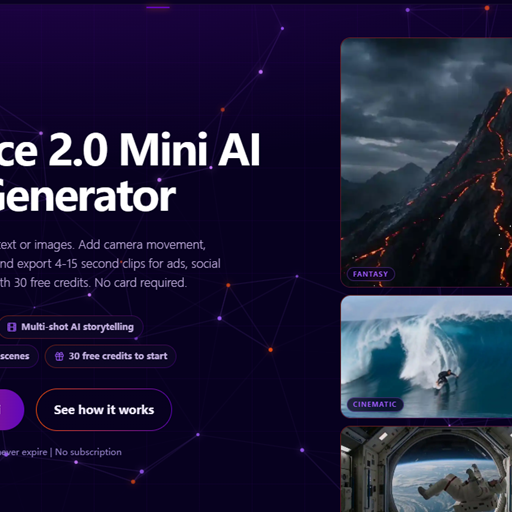
Seedance 2.0 Mini is a lightweight AI video generator for creating fast prompt-to-video drafts, social clips, campaign concepts, and browser-based visual experiments.